Quick Start
If you don't have have access to the docker image or don't have access to the iOS sdk repository, please contact us at info@silencelaboratories.com.
Here is how you can setup the Mobile SDK and perform MPC operations in less than a minute.
You will create a working MPC two-party setup, where the first party, an iOS application interacts with Trio Server as a second party, and a third party.
Prerequisites
For quick testing, the demo server is already deployed at trio-server.demo.silencelaboratories.com. We are using this server for the quickstart guide.
The Cloud Verifying Key for the demo server is 019c4c79e942bbc3ff1d6ace7256404d701498056978cc4638c35832acdf821b1e.
The Cloud Node Endpoint for the demo server is https://trio-server.demo.silencelaboratories.com.
Setup the Mobile SDK (iOS)
Create a new XCode project by following the official guide or use existing one.
Dependency Installation
Step 1: Create Package URL
- Get access to the repository https://github.com/silence-laboratories/silentshard-artifacts from the Silence Laboratories team.
- Get the package URL
- Add GitHub account : Skip this step if you already have added your GitHub account in Xcode. You can add your GitHub account by following the steps ( only until it adds your GitHub account).
- Final package URL: https://github.com/silence-laboratories/silentshard-artifacts.
Step 2: Open Package(SPM) Collection Window
- In Xcode, open the Project Navigator.
- Select the project file (the root item in the navigator).
- In the Project Editor, select your project(Your Xcode Project title under
Projectsection). - Navigate to the Package Dependencies tab. See below
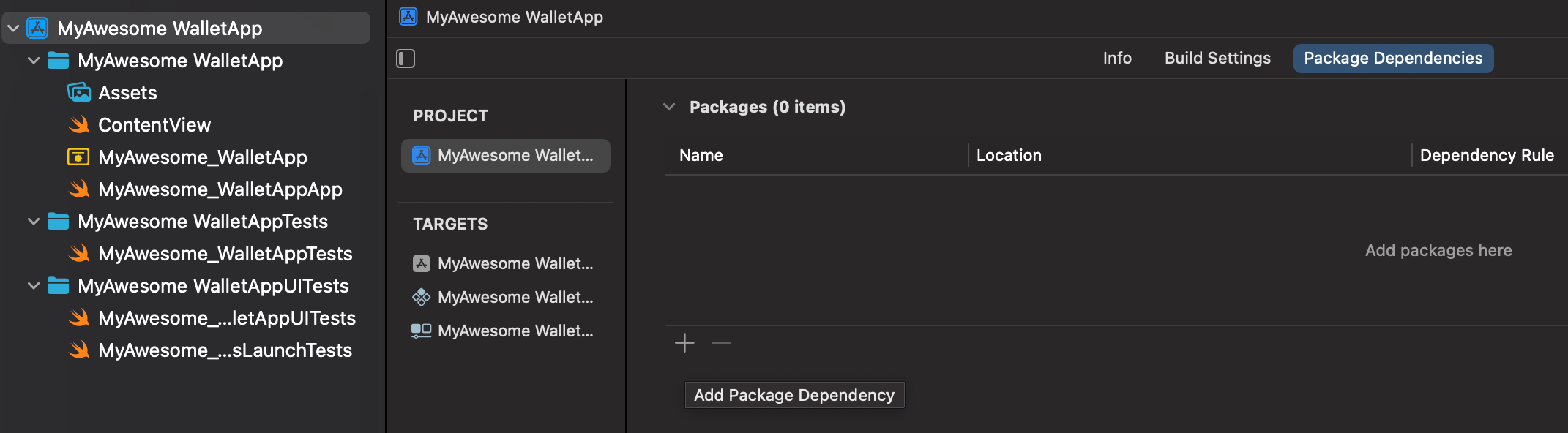
- Click the + icon (hint :Add Package Dependency) at the bottom of the Package Dependencies section.
- A dialog box will appear prompting you to enter a package URL.
Step 3: Add Package
- Copy the package URL (We get this from Step 2).
- Paste this URL into the
Search or Enter Package URLbox.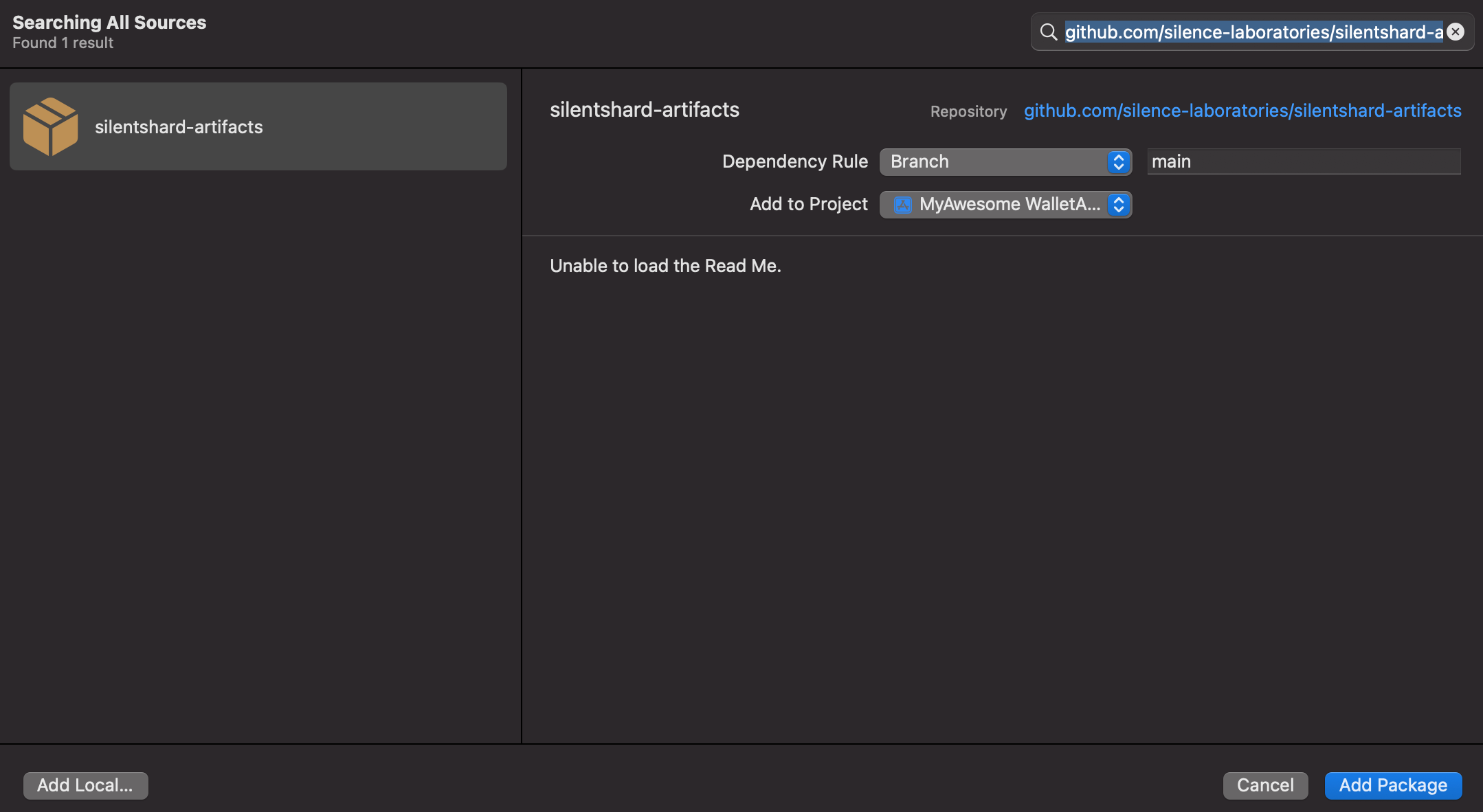
- Select the
silentshard-artifactson the left panel. - Click Add Package to proceed.
Step 4: Confirm and Add Package
- Xcode will fetch the package details.
- Add library (silentshardtrio, c2dkls, duo_schnorr) to your targets By clicking dropdown from the "
Add to Target" items.
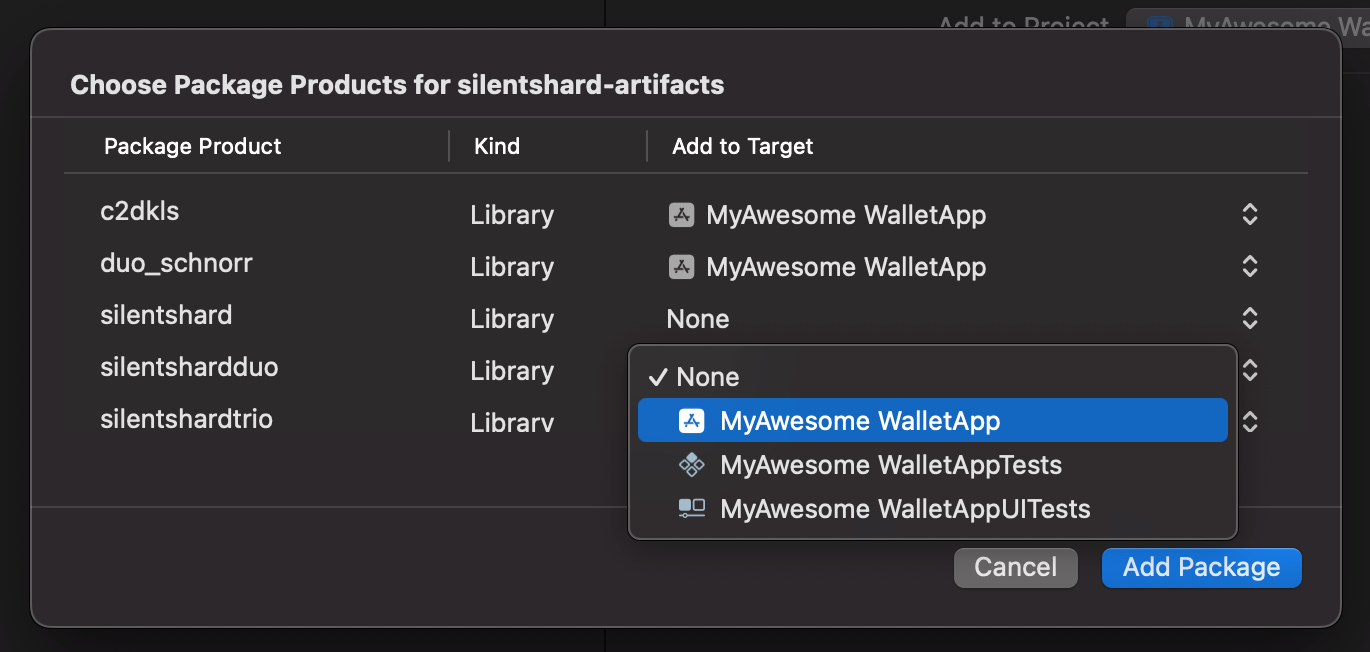
- Click Add Package to complete the installation.
Session Creation
Instantiate TrioSession object, which could be used to perform all of the supported MPC operations such as keygen, sign etc.
import silentshardtrio

class CustomStorageClient: StorageClient {

    /*
     * Representing in-memory database. In real world it should be some SQL based DB or
     * secure storage or custom hardware. It's up to the implementation app's use-case.
     */
    private var keyshareDaoSet: Set<ReconcileStoreDao> = []

    func write(dao: ReconcileStoreDao) async {
        if !keyshareDaoSet.insert(dao).inserted {
            keyshareDaoSet.remove(dao)
            keyshareDaoSet.insert(dao)
        }
    }

    func read(key: String) async throws -> ReconcileStoreDao? {
        return keyshareDaoSet.first { $0.keyId == key }
    }
}
import silentshardtrio

let CLOUD_NODE_URI = "trio-server.demo.silencelaboratories.com"
//let PORT = "8080"

//Other party verifying-key/public-key
let cloudVerifyingKey = "019c4c79e942bbc3ff1d6ace7256404d701498056978cc4638c35832acdf821b1e"

//Create websocketConfig to let SilentShard use default WebsocketClient.
let websocketConfig: silentshardtrio.WebsocketConfig =
    WebsocketConfigBuilder()
        .withBaseUrl(CLOUD_NODE_URI)
        //If applies
        //.withPort(PORT)
        // false if local development server without SSL
        .withSecure(true)
        //If applies
        //.withAuthenticationToken("")
        .build()

//Create storage client instance to manage keyshare state
let storageClient = CustomStorageClient()

//Create trioSession

/*
We only have to pass websocketConfig which contains the server config and
communication will be handled by internal websocketClient*/
let trioSession = SilentShard.ECDSA.createTrioSession(
    cloudVerifyingKey: String(cloudVerifyingKey),
    websocketConfig: websocketConfig,
    storageClient: storageClient)
/*
//or for EdDSA algorithm
let trioSession = SilentShard.EdDSA.createTrioSession(
    cloudVerifyingKey: String(cloudVerifyingKey),
    websocketConfig: websocketConfig,
    storageClient: storageClient)
*/
Run the MPC operations
After creating the session, you can perform MPC operations.
Key Generation
Generate MPC keyshares and return the client keyshare with keygen method.
let result: Result<Data, any Error> = await trioSession.keygen()
switch result {
    case .success(let dataBytes):
        do {
            // do something with keyshare dataBytes
            Swift.print(dataBytes)
            return dataBytes
        }
    case .failure(let error):
        do {
            // show error to user or abort process
            Swift.print(error)
            return nil
        }
}
Signature Generation
Sign a message using the signature method.
let messageHash = "53c48e76b32d4fb862249a81f0fc95da2d3b16bf53771cc03fd512ef5d4e6ed9"
let result = await trioSession.signature(
            keyshare: keyshare,
            message: messageHash,
            chainPath: "m"  // This is the default, use your desired path here. For e.g 'm/1/2'
        )
switch result {
    case .success(let dataBytes):
        do {
            // do something with signature dataBytes
            Swift.print(dataBytes)
            return dataBytes
        }
    case .failure(let error):
        do {
            // show error to user or abort process
            Swift.print(error)
            return nil
           }
}
Complete Code Example
import silentshardtrio

class CustomStorageClient: StorageClient {

    /*
     * Representing in-memory database. In real world it should be some SQL based DB or
     * secure storage or custom hardware. It's up to the implementation app's use-case.
     */
    private var keyshareDaoSet: Set<ReconcileStoreDao> = []

    func write(dao: ReconcileStoreDao) async {
        if !keyshareDaoSet.insert(dao).inserted {
            keyshareDaoSet.remove(dao)
            keyshareDaoSet.insert(dao)
        }
    }

    func read(key: String) async throws -> ReconcileStoreDao? {
        return keyshareDaoSet.first { $0.keyId == key }
    }
}
import SwiftUI
import silentshardtrio

struct ContentView: View {

    let CLOUD_NODE_URI = "trio-server.demo.silencelaboratories.com"
    //let PORT = "8080"

    //Other party verifying-key/public-key
    let cloudVerifyingKey = "019c4c79e942bbc3ff1d6ace7256404d701498056978cc4638c35832acdf821b1e"

    //Create websocketConfig to let SilentShard use default WebsocketClient.
    let websocketConfig: silentshardtrio.WebsocketConfig =
        WebsocketConfigBuilder()
            .withBaseUrl(CLOUD_NODE_URI)
            //If applies
            //.withPort(PORT)
            // false if local development server without SSL
            .withSecure(true)
            //If applies
            //.withAuthenticationToken("")
            .build()

    //Create storage client instance to manage keyshare state
    let storageClient = CustomStorageClient()

    //Create trioSession

    /*
    We only have to pass websocketConfig which contains the server config and
    communication will be handled by internal websocketClient*/
    let trioSession = SilentShard.ECDSA.createTrioSession(
        cloudVerifyingKey: String(cloudVerifyingKey),
        websocketConfig: websocketConfig,
        storageClient: storageClient)
    /*
    //or for EdDSA algorithm
    let trioSession = SilentShard.EdDSA.createTrioSession(
        cloudVerifyingKey: String(cloudVerifyingKey),
        websocketConfig: websocketConfig,
        storageClient: storageClient)
    */

    var body: some View {
        VStack {
            Image(systemName: "globe")
                .imageScale(.large)
                .foregroundStyle(.tint)
            Text("Hello, world!")
            Button("Tap me") {
                Task {
                    let result: Result<Data, any Error> = await trioSession.keygen()
                    switch result {
                    case .success(let keyshareDataBytes):
                        do {
                            // do something with keyshare dataBytes
                            let messageHash = "53c48e76b32d4fb862249a81f0fc95da2d3b16bf53771cc03fd512ef5d4e6ed9"
                            let signatureResult = await trioSession.signature(
                                keyshare: keyshareDataBytes,
                                message: messageHash,
                                chainPath: "m"  // This is the default, use your desired path here. For e.g 'm/1/2'
                            )
                            switch signatureResult {
                            case .success(let signatureDataBytes):
                                do {
                                    // do something with signature dataBytes
                                    Swift.print(signatureDataBytes)
                                    return signatureDataBytes
                                }
                            case .failure(let error):
                                do {
                                    // show error to user or abort process
                                    Swift.print(error)
                                    return nil
                                }
                            }
                        }
                    case .failure(let error):
                        do {
                            // show error to user or abort process
                            Swift.print(error)
                            return nil
                        }
                    }
                }
            }
        }
        .padding()
    }
}
Once the app launches, check your console logs to see the key generation and signing process updates in real-time.