Installation
Step 1: Create access token for the repository and package
- Get access to the repository https://github.com/silence-laboratories/silentshard-artifacts from the Silence Laboratories team.
- Create a personal access token at https://github.com/settings/tokens with the following scopes
checked[✓] to access the repository, and it's
associated GithubPackages
through gradle.
- Under
repo-> [✓]public_repo - Under
write:packages-> [✓]read:packages
We can leavewrite:packagesuntouched/unchecked as we only need read access - It will end up looking like this : Two items checked everything else unchecked. See below.
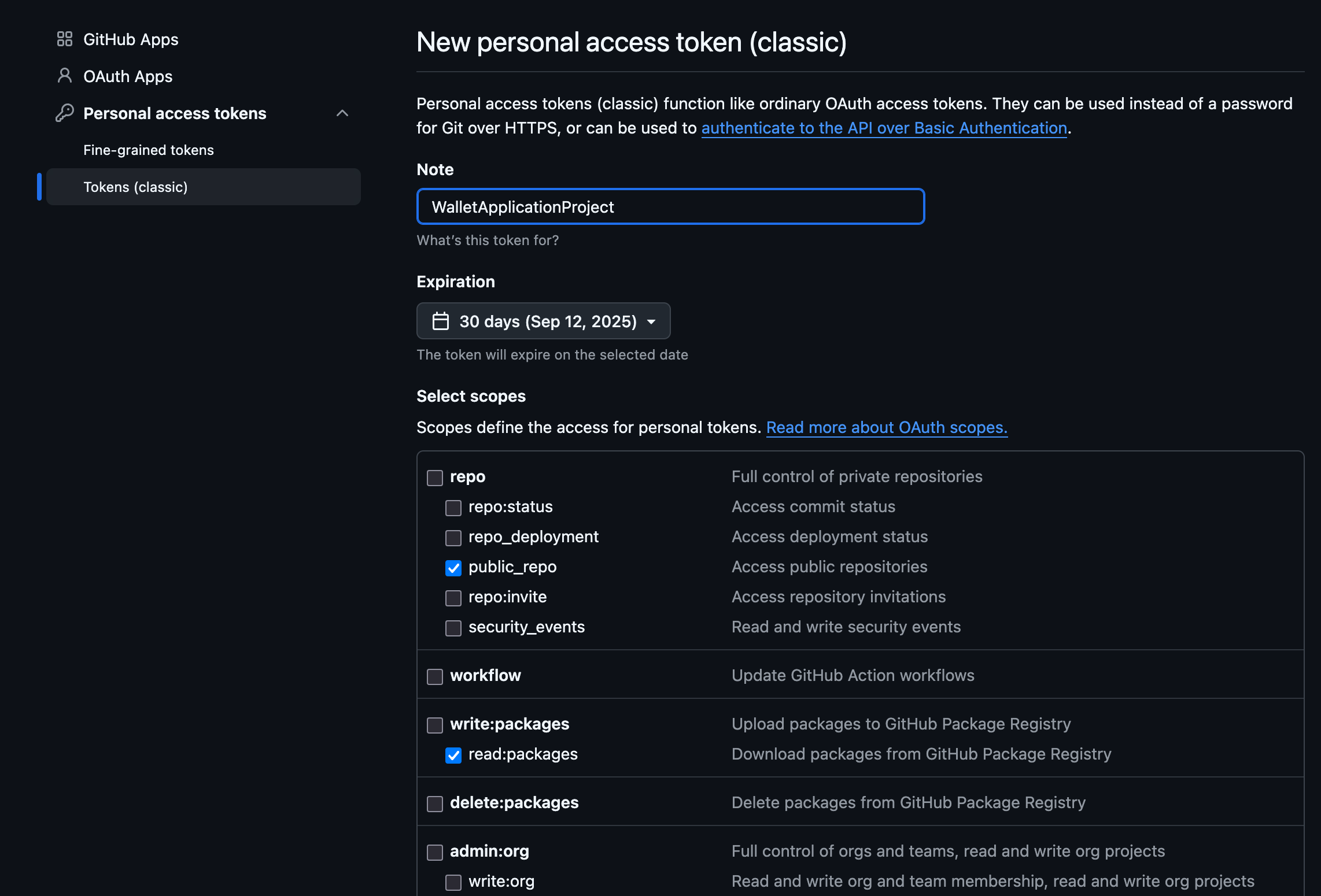
- Under
Step 2: Configure settings.gradle.kts
-
Add the following maven repo under the dependencyResolutionManagement -> repositories :
Under
dependencyResolutionManagement{
//Other stuff
repositories{
//Add here the block shown below
  }
//Other stuff
}
Add the following
maven {
    url =
        uri("https://maven.pkg.github.com/silence-laboratories/silentshard-artifacts")
    credentials {
        // In production app we store private credentials outside of the files added to git.
        username = "github_username"
        password = "token_we_just_created"
    }
}- Replace
github_usernamewith your github username(The one we used for creating token). - Replace
token_we_just_createdwith the token we created.
- Replace
-
Your final
dependencyResolutionManagementblock will look like this (along with your own configuration)dependencyResolutionManagement {
repositoriesMode.set(RepositoriesMode.FAIL_ON_PROJECT_REPOS)
repositories {
google()
mavenCentral()
maven {
url =
uri("https://maven.pkg.github.com/silence-laboratories/silentshard-artifacts")
credentials {
// In production app we store private credentials outside of the files added to git.
username = "github_username"
password = "token_we_just_created"
}
}
//Other private repos or other resolution configuration. Or maybe another maven repo.
}
}
Step 3: Configure app level build.gradle.kts
-
Add the following dependency in your dependencies block
implementation("com.silencelaboratories.silentshard:duo-android:1.0.0") -
Your final
dependenciesblock will look like thisdependencies {
implementation("com.silencelaboratories.silentshard:duo-android:1.0.0")
//Your Other dependencies
//..
//..
}
Step 4: Gradle-Sync
- Sync gradle with project files and that's it.